
Clock Tacular4.1 - App Store
You'll be able to see results in few seconds.
Publisher Description
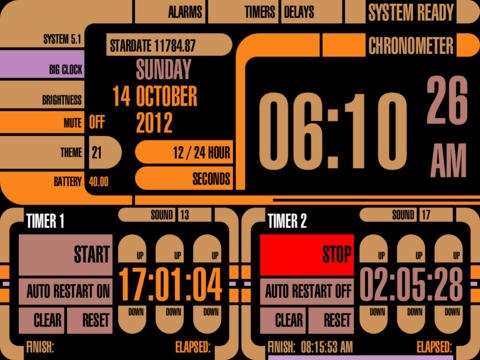
Clock Tacular has 4 Alarm Clocks and 4 Countdown Timers along with a very large Digital Clock for distance viewing. Fully Multi-Tasking aware, all alarms/timers will fire when the app is in the background and even when the iPad is off. All Portrait and Landscape orientations are supported, and there are 26 color Themes to choose from using futuristic graphics. You can have a separate Theme for Portrait and Landscape orientations, and a third theme for the Big Clock view. You can choose from 20 different sound fx for the alarms/timers. Time is displayed in 12 hour or 24 hour versions. The alarm clock automatically resets to fire the next day after dismissal. There is a brightness dimmer with 5 different levels, which is really useful for dimming when sleeping.
All 4 Countdown Timers have extra features that are useful for molecular biologists, lab technicians, and broadcast professionals, among others. They can also be used for simpler tasks such as cooking, workouts and training, timed medications, tracking your productivity, keeping yourself focused, reminding yourself to take breaks to rest your eyes every 10 minutes, and reminding yourself to take a break from the computer every 50 minutes to stretch and relax.
Each Countdown Timer with Pro Features has:
==================
A maximum time value of 99 hours 59 minutes and 59 seconds.
Individual Hours:Minutes:Seconds Up/Down buttons that rollover.
Decrementing Progress Bar during countdown for quick visual inspection.
Big Flashing Indicator when the countdown completes.
Alarm Sound plays every 5 seconds when the countdown completes.
Projected Finish Time.
Incrementing Elapsed Time after the countdown completes.
One-click time reset after countdown completes.
One-click Clear HH:MM:SS to 00:00:00.
NEW: Auto Restart with configurable delay.
==================
See the screenshots below.
Be sure and check out the Quick Start Guide at the App13X.com site.
Live Long and Prosper \\//
Features:
4 Alarm Clocks with 15 Minute Snooze
4 Countdown Timers
Digital Clock
Big Digital Clock View
Portrait and Landscape Modes
Fully MultiTasking and Background Aware
Remaining Snooze Time Readout and Progress Bar, during Snooze.
Alarms Clocks show the time remaining (and progress bar) until the next time they trigger.
Alarm Clocks can be set using 12-Hour or 24-Hour parameters.
All Countdown Timers have Auto Restart with configurable Delay Times.
Auto Restarting Countdown Timers show the amount of time until the next restart.
26 Color Themes
Separate Theme for Portrait and Landscape
20 Alarm Sound FX
Date (Day Name, Weekday, Month, Year)
12 Hour or 24 Hour Time
Brightness Dimmer (5 Levels)
System Version Readout
Millennium StarDate
The Seconds Readout can be toggled On/Off
Mute Sound FX, for Silent Operation
Battery Status Readout and GUI.
Feedback:
If you have any questions, send them to
support@applenexus.com
Use the same email address if you have suggestions for new features, general feedback, or if you discover a bug in the app.
Feedback is both welcome and encouraged. It helps me make the app as awesome as possible.
Requires iOS 5.1 or later. Compatible with iPad.
About Clock Tacular
The company that develops Clock Tacular is David Barnhardt. The latest version released by its developer is 4.1.
To install Clock Tacular on your iOS device, just click the green Continue To App button above to start the installation process. The app is listed on our website since 2011-06-07 and was downloaded 0 times. We have already checked if the download link is safe, however for your own protection we recommend that you scan the downloaded app with your antivirus. Your antivirus may detect the Clock Tacular as malware if the download link is broken.
How to install Clock Tacular on your iOS device:
- Click on the Continue To App button on our website. This will redirect you to the App Store.
- Once the Clock Tacular is shown in the iTunes listing of your iOS device, you can start its download and installation. Tap on the GET button to the right of the app to start downloading it.
- If you are not logged-in the iOS appstore app, you'll be prompted for your your Apple ID and/or password.
- After Clock Tacular is downloaded, you'll see an INSTALL button to the right. Tap on it to start the actual installation of the iOS app.
- Once installation is finished you can tap on the OPEN button to start it. Its icon will also be added to your device home screen.
Program Details
System requirements
Download information
Pricing
Version History
version 4.1
posted on 2011-06-07
Disclaimer
Official App Store Link
We do not host Clock Tacular on our servers. We did not scan it for viruses, adware, spyware or other type of malware. This app is hosted by Apple and passed their terms and conditions to be listed there. We recommend caution when installing it.
The App Store link for Clock Tacular is provided to you by apps112.com without any warranties, representations or guarantees of any kind, so access it at your own risk.
If you have questions regarding this particular app contact the publisher directly. For questions about the functionalities of apps112.com contact us.
